

With Teacher Make-Up Management in Opus1.io, music and dance schools can let teachers manage make-up lessons for their own students: viewing make-up credits, sending a family a proposal, or booking the make-up directly, while the owner decides what each teacher is allowed to do. It’s built for schools where teachers already coordinate schedules with their students, and it’s one of the most requested features from Opus1 schools.
Here’s how the two common approaches to make-ups compare, what teacher-led schools need from their software, and how to roll it out.
Two Ways Schools Handle Make-Ups (and Both Work)
Ask ten school owners how they handle make-up lessons and you’ll hear ten slightly different answers. Most land somewhere between two models.
Front-desk-led. Families contact the office, and staff find a time and book it. This works well when you want one consistent point of contact and a close eye on the schedule.
Teacher-led. Families work things out with their teacher, who finds a time that fits both of them. This is common at schools with in-home lessons, contract teachers, or long-standing relationships between teachers and families.
Plenty of schools mix the two, giving a few experienced teachers more room while the front desk handles everyone else. There’s no single right answer. What matters is that your software supports the way you’ve chosen to run your school.
What Teacher-Led Schools Need from Their Software
If your teachers coordinate make-ups with families, these are the capabilities that keep it running smoothly.
1. Control at the Teacher Level
Not every teacher needs the same access. Owners should be able to choose, teacher by teacher, who can view credits, who can offer times, and who can book.
2. Visibility into Make-Up Credits
When a parent asks how many make-ups are left, the teacher should be able to check right away instead of sending the question to the office.
3. A Choice Between Proposing and Booking
Some schools want families to confirm a make-up time. Others are happy for teachers to put it straight on the calendar. Good software supports both.
4. Guardrails That Protect the Business
Teachers need enough access to help their students, and no more. That means seeing only their own students and never touching credits or balances.
5. Built for a Phone
Teachers move between rooms, homes, and studios. If it doesn’t work well on mobile, it won’t get used.
Meet Teacher Make-Up Management in Opus1
Part of our Teacher Management features, which are designed to fit the way your school runs – not force you to change your policies to fit a software.
For teachers, every option starts at None, so nothing changes for them until an owner turns it on. Owners, managers and front desk staff get the new tools right away. Here’s what it includes:
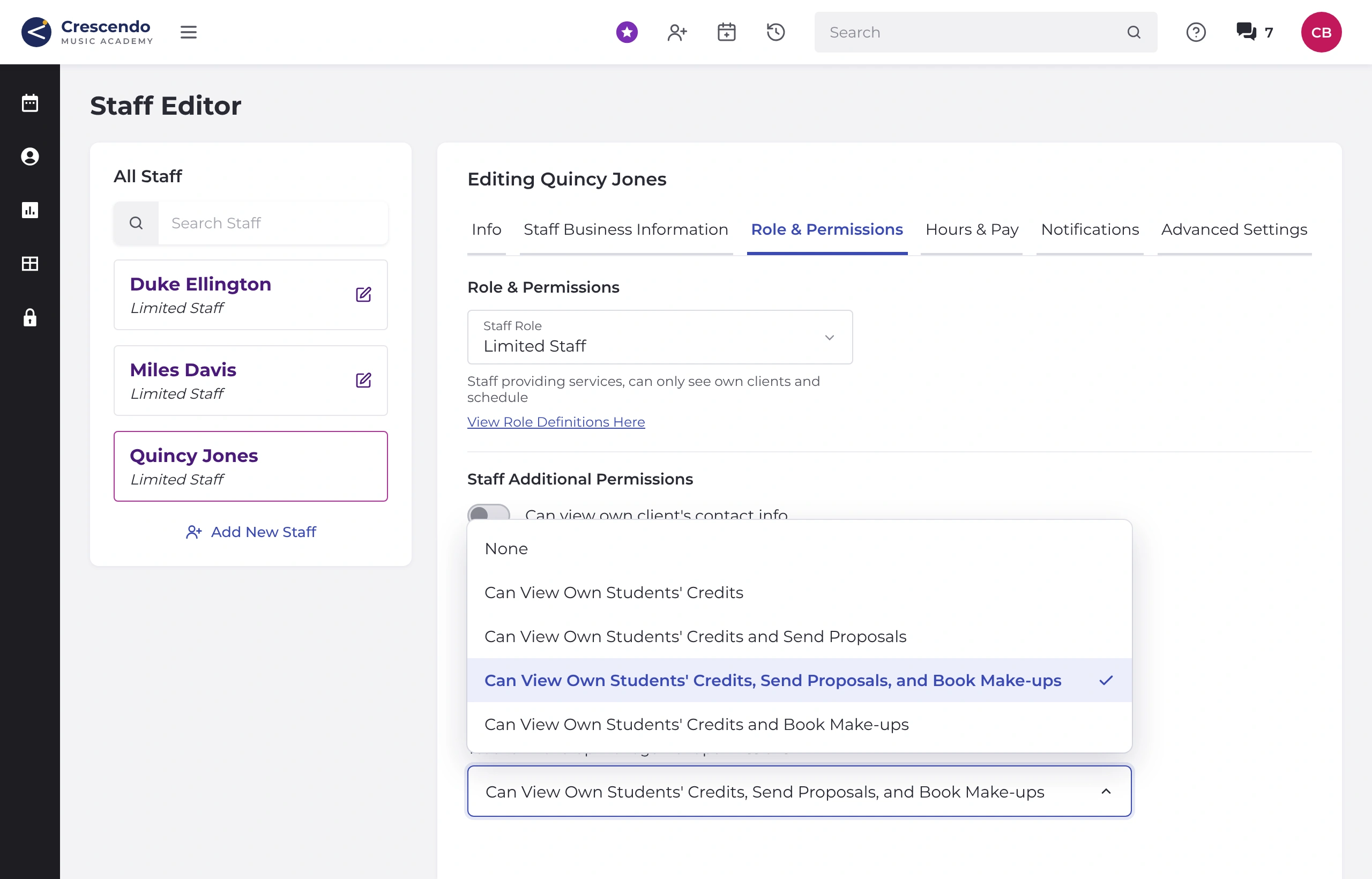
- Per-teacher access from a Role & Permissions tab in the staff editor, with five options: None, Can View Own Students’ Credits, View and Send Proposals, View and Book Make-ups, or View, Send Proposals, and Book Make-ups
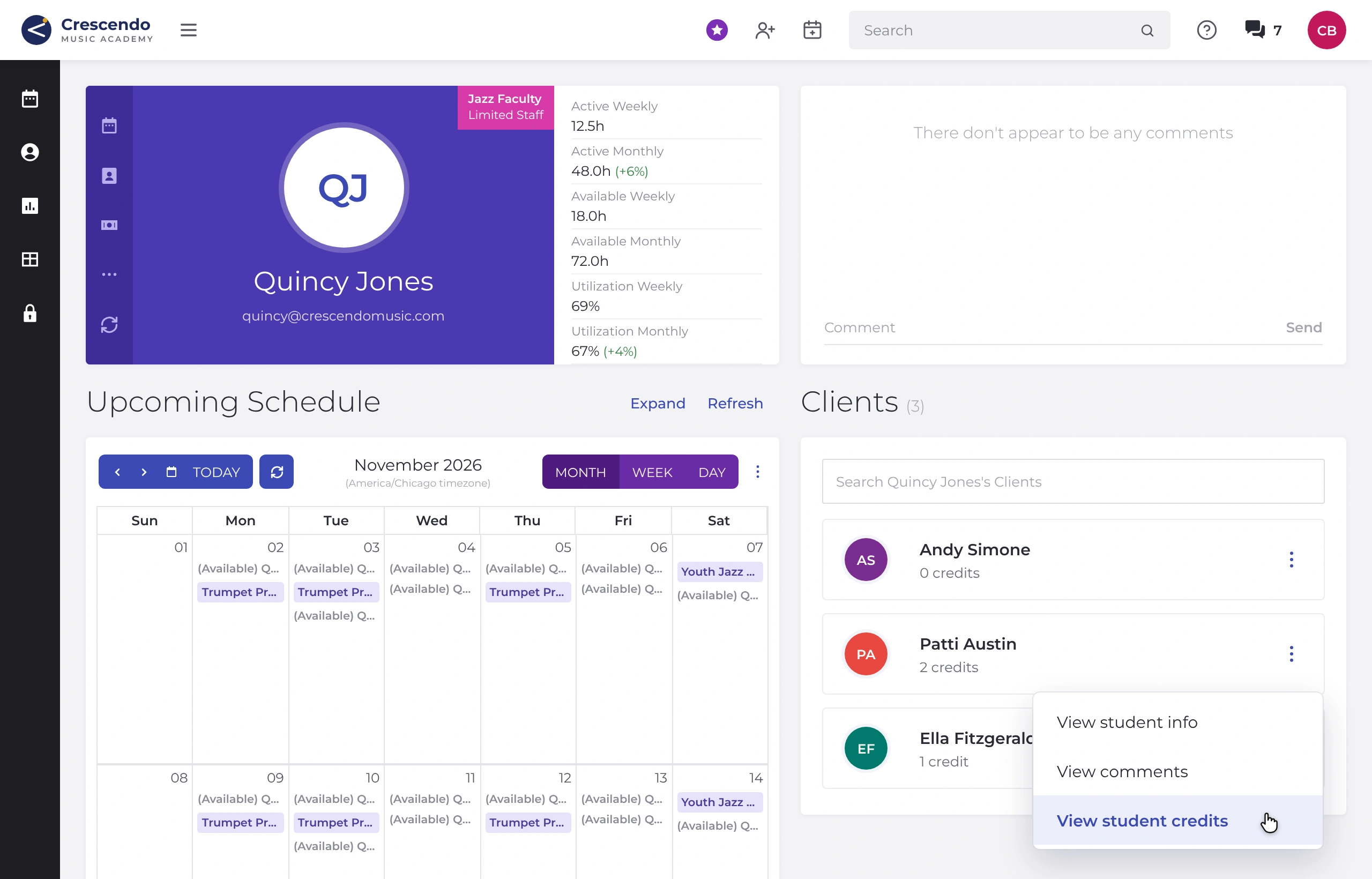
- Make-up credits on the teacher’s student list, showing the unused credits each student has with that teacher. When a lesson is canceled, its make-up credit is assigned to that lesson’s teacher automatically.
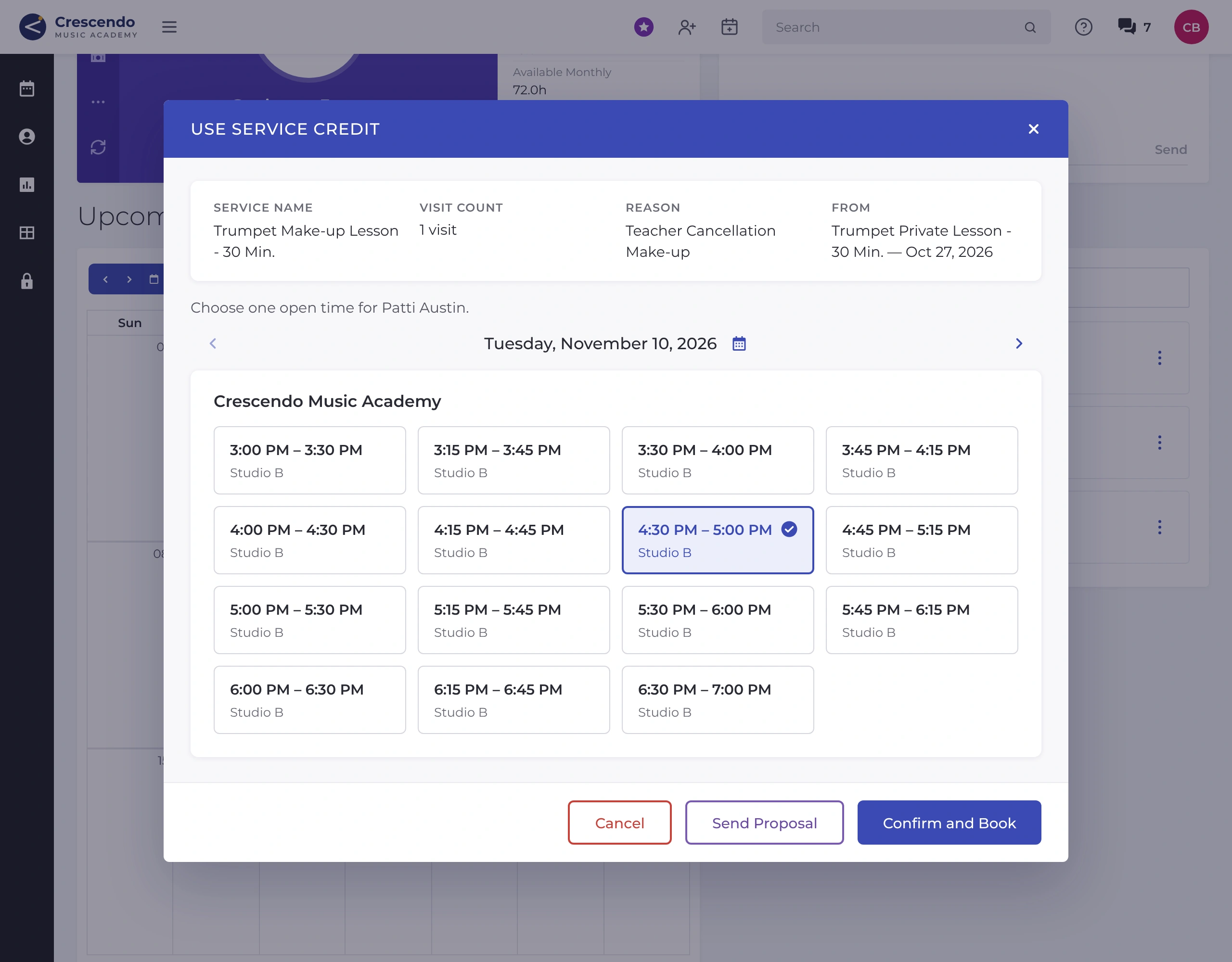
- Make-up proposals for an open slot or class date, with an optional personal note, that the family confirms on their own time
- Direct booking into an open slot or class date, with confirmations sent to the student, their account managers and the teacher
- Faster slot finding, with the picker jumping to the soonest date with availability
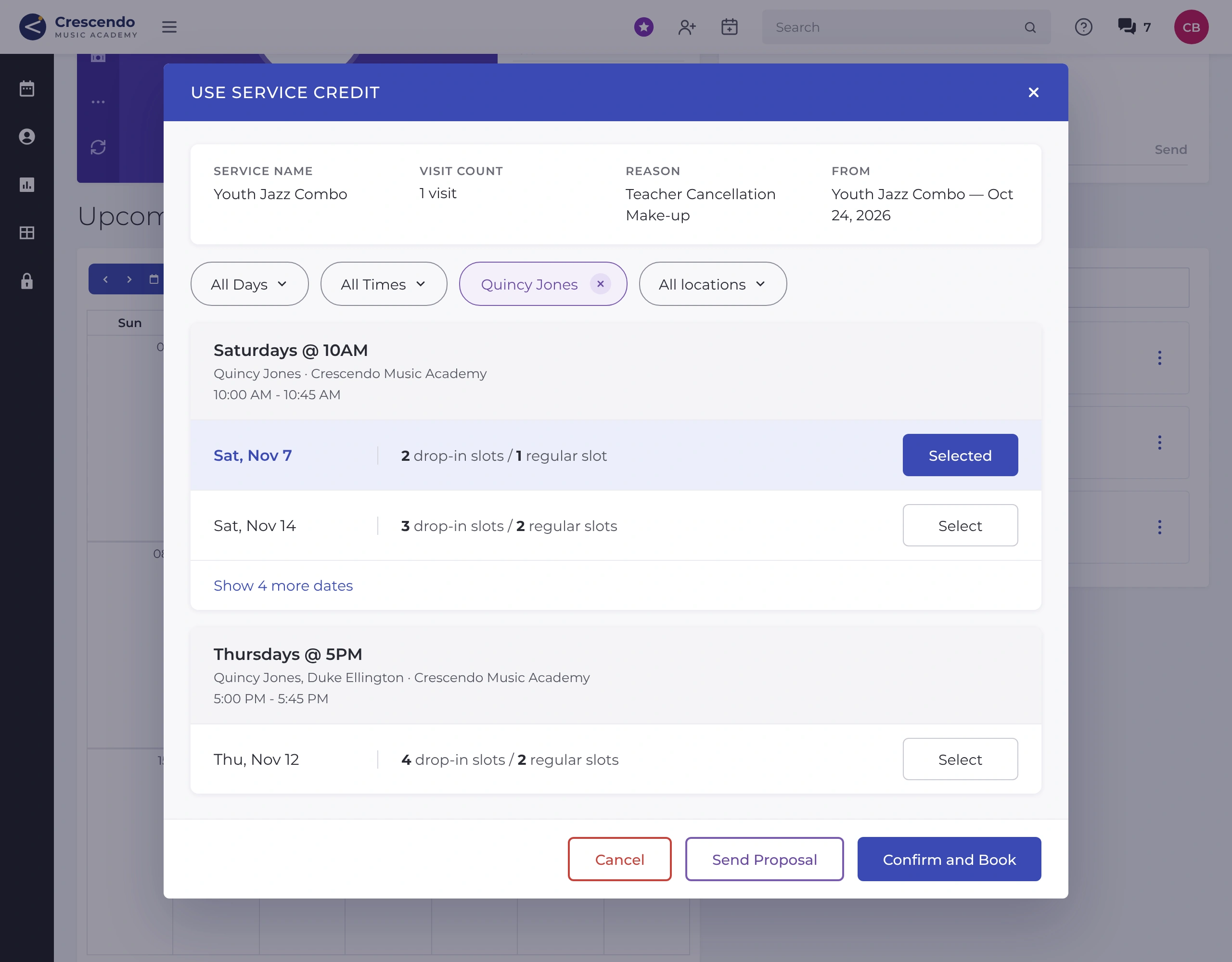
- Group class make-ups that start with the teacher’s own classes (including co-taught ones), with the option to choose any class
- The same tools for the front desk, on by default, so owners, managers and staff can view credits, propose and book from any teacher’s student list
- Designed mobile-first, so teachers can check credits, send a proposal or book a make-up from their phone between lessons
The Guardrails Owners Care About
Giving teachers more room shouldn’t mean giving up control. With Teacher Make-Up Management:
- Teachers only see students on their own student list, and only the make-up credits assigned to them
- Teachers can’t add, edit or delete make-up credits
- Teachers never see monetary credits or account balances
- Proposals and bookings use open slots and existing class dates only
Best Practices for Teacher-Managed Make-Ups
- Match access to your make-up policy. If families should confirm times, use proposals. If teachers can schedule on the spot, use booking. Teachers with booking access aren’t limited by your self-booking window, so if you’d like that window to apply, stick with proposals.
- Tell families who to contact. A quick note about whether make-ups go through the teacher or the office avoids mixed messages.
- Walk teachers through it. A few minutes on where to find credits and how to propose or book saves a lot of questions later.
- Check in after a few weeks. Make-up proposals appear in your Proposals report, so you can see how it’s going.
What Schools Are Saying
“Teachers are thrilled with the new visibility and ability to self manage more aspects of their lesson business… teachers are already seeing fuller schedules as a result of their ability to fill in the openings.” Sean Naylor, George’s Music
Frequently Asked Questions
Can teachers see their students’ make-up credits?
Yes, if the owner turns it on. On their own student list, enabled teachers see how many make-up credits each student has with them. When a lesson is canceled, its make-up credit is assigned to that lesson’s teacher automatically.
Can teachers book make-up lessons themselves?
Yes. With a booking option turned on, teachers can book a make-up into an open slot or existing class date, and confirmations go out to the student, their account managers and the teacher.
Do teachers have to follow my self-booking window?
No. Teachers with booking access can book any open slot on their schedule. If you’d like make-ups to stay within your self-booking window, give those teachers the proposal option only, so the family confirms the time.
Can I choose which teachers get access, and how much?
Yes. Owners and managers choose one of five options for each teacher on the Role & Permissions tab. Every teacher starts at None. Owners, managers and front desk staff have the tools by default.
Can teachers change or delete make-up credits?
No. Teachers can use a credit to propose or book a make-up, but they can’t add, edit or delete credits.
Can teachers see a family’s account balance?
No. Teachers never see monetary credits or account balances.
Does it work on mobile?
Yes. Teacher Make-Up Management was designed mobile-first, since that’s where most teachers use Opus1.
Run Make-Ups the Way Your School Runs
We power the business behind the passion, so teachers can inspire and students fall in love with the arts. Whether your front desk owns make-ups or your teachers do, Opus1 is built to fit how you run your school.
Already an Opus1 customer? Set it up for your teachers: How do I let teachers book their students’ make-ups?
New to Opus1? Book a demo to see how Opus1.io helps growing music schools and dance schools admin less and inspire more.